






WhatsApp Coexistence: Technical Architecture, Enterprise Use, and the Future of Hybrid Messaging
Introduction
WhatsApp has become the world’s most ubiquitous messaging platform, with over 3 billion monthly active users and a dominant presence in markets from India and Brazil to Europe and Southeast Asia. For businesses, WhatsApp is not just a channel for customer engagement—it’s a critical touchpoint for sales, support, and marketing. Yet, until recently, organizations faced a stark choice: stick with the WhatsApp Business App for manual, personal conversations, or migrate to the WhatsApp Cloud API for automation and scale—often at the cost of losing chat history, contacts, and the familiar app interface.
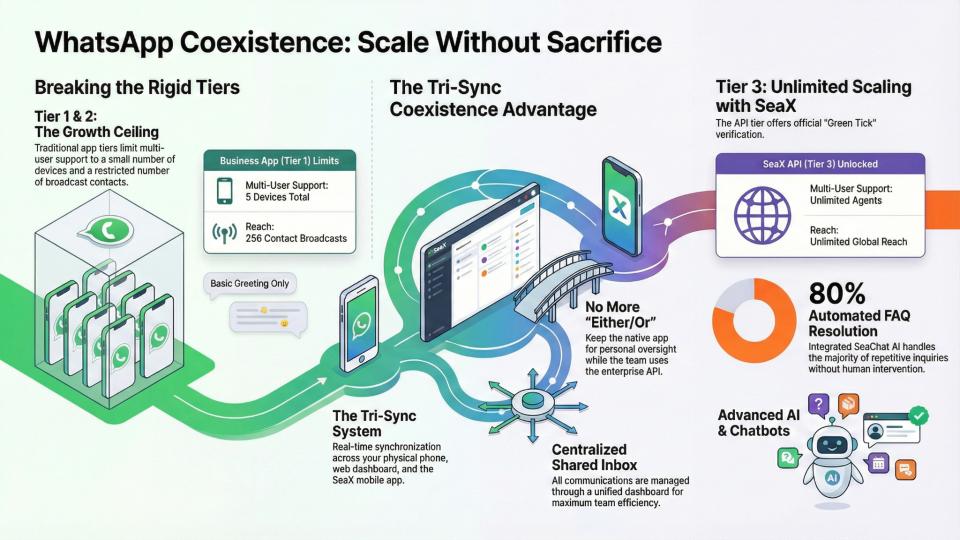
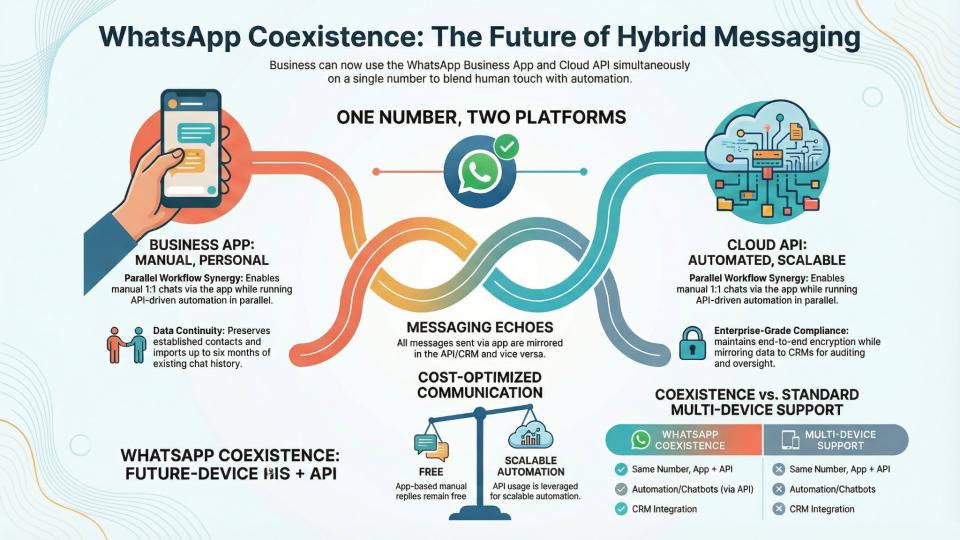
Enter WhatsApp Coexistence: a transformative feature that allows businesses to use both the WhatsApp Business App and the WhatsApp Cloud API on the same phone number, simultaneously, with real-time synchronization of messages and contacts. This hybrid model bridges the gap between personal engagement and enterprise automation, unlocking new possibilities for customer experience, operational efficiency, and compliance.
In this comprehensive report, we’ll explore the technical underpinnings of WhatsApp Coexistence, its deployment models, use cases, and business impact. We’ll compare it with alternative approaches such as multi-device support, dual-SIM handling, and third-party integrations. Special attention will be given to enterprise deployments, including contact centers and BYOD (Bring Your Own Device) scenarios, as well as security, compliance, and user experience considerations. Throughout, we’ll maintain a balance of technical depth and business relevance, in the spirit of Seasalt.ai’s insightful, business-savvy analysis.
1. Overview of WhatsApp Coexistence
1.1 What Is WhatsApp Coexistence?
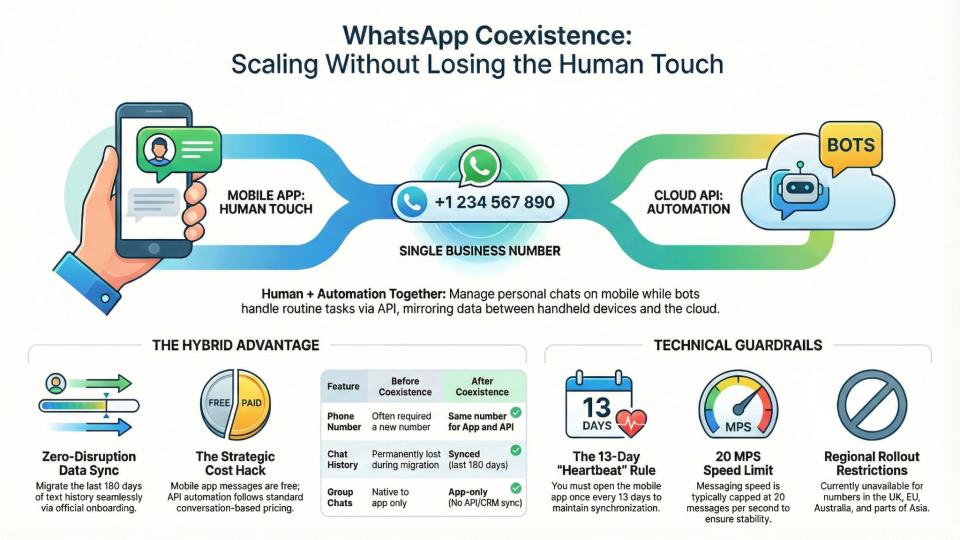
WhatsApp Coexistence is a feature introduced by Meta in 2025 that enables businesses to operate both the WhatsApp Business App and the WhatsApp Cloud API on the same phone number, at the same time. This means that manual, app-based conversations and automated, API-driven workflows can run in parallel, with messages and contacts synchronized across both platforms.
Prior to this update, businesses had to choose: either remain on the Business App (with its limitations in automation and multi-agent support) or migrate to the API (losing app access, chat history, and sometimes even the business phone number). Coexistence eliminates this trade-off, allowing organizations to scale their messaging operations without disrupting established customer relationships or workflows.
1.2 Why Was Coexistence Introduced?
Meta’s motivation for launching Coexistence was to remove the friction that businesses faced when scaling from app-based messaging to API-driven automation. The previous “all-or-nothing” migration model created operational bottlenecks, forced number changes, and led to loss of valuable customer context. Coexistence was designed to:
- Enable seamless transition to automation without losing chat history or contacts
- Allow businesses to retain their existing WhatsApp number and app interface
- Support hybrid workflows, blending manual and automated engagement
- Lower the barrier to API adoption for SMBs and growing teams
1.3 Key Benefits
- Unified Communication: Use the same number for both manual and automated messaging
- Data Continuity: Preserve chat history, contacts, and business context
- Operational Flexibility: Blend human touch with automation as needed
- Cost Optimization: Use free app messaging for 1:1 chats, API for scalable automation
- Seamless Onboarding: No need for disruptive migrations or retraining
2. Technical Architecture of WhatsApp Coexistence
2.1 Core System Design
At its heart, WhatsApp Coexistence is built on a dual-platform integration model. The WhatsApp Business App (mobile) and the WhatsApp Cloud API (server-side) are linked via a shared Meta Business Account, with real-time synchronization of messages, contacts, and (optionally) up to six months of chat history.
2.1.1 Messaging Echoes
A key innovation is the Messaging Echoes system: messages sent via the app are mirrored in the API inbox, and vice versa. This ensures that conversations remain consistent across both platforms, regardless of where they originated.
2.1.2 Synchronization Flow
- Initial Setup: The business scans a QR code from the API provider using the WhatsApp Business App, authorizing the connection and (optionally) syncing recent chat history.
- Ongoing Sync: New messages, contacts, and conversation threads are mirrored in real time between the app and the API/CRM platform.
- Data Storage: Up to six months of chat history can be imported during onboarding; ongoing messages are kept in sync as long as the app remains active.
2.1.3 Platform Components
| Component | Role/Function |
|---|---|
| WhatsApp Business App | Maintains native mobile UI, supports manual chats, and preserves chat history |
| WhatsApp Cloud API | Enables automation, multi-agent access, CRM integration, and advanced analytics |
| Middleware/CRM Platform | Synchronizes messages, manages routing, provides dashboards, and supports automation |
| Meta Business Account | Centralizes business identity, permissions, and number management |
2.2 Data Model and API Design
The underlying data model is designed to support both app-based and API-driven workflows:
- Users Table: Stores user info (name, phone, etc.)
- Messages Table: Stores message content, type, timestamps, and delivery status
- Chats Table: Maps users to conversations (1:1 or group)
- Contacts Table: Synced across app and API
- Groups Table: Managed in the app; not mirrored in the API under coexistence
API endpoints support sending, receiving, and syncing messages, as well as managing contacts and chat history. The Cloud API supports advanced features such as template messaging, chatbots, and workflow automation, while the app retains its familiar interface for manual engagement.
2.3 Synchronization and Limitations
- Chat History: Up to six months can be imported during onboarding; ongoing sync is real-time
- Contacts: Fully synchronized
- Groups: Remain in the app; not mirrored in the API
- Broadcast Lists: Disabled in coexistence mode; replaced by API templates for bulk messaging
- Feature Restrictions: Some app features (e.g., disappearing messages, live location, message edit/revoke) are disabled or not supported in coexistence mode
2.4 Security and Encryption
WhatsApp’s end-to-end encryption remains in place for all 1:1 and group chats. Messages are encrypted on the device and decrypted only by the recipient. When messages are mirrored to the API or CRM, they are handled according to WhatsApp’s security protocols and the compliance requirements of the business’s chosen platform.
3. Setup Prerequisites and Eligibility
3.1 Prerequisites
To enable WhatsApp Coexistence, businesses must meet the following criteria:
- Active WhatsApp Business App: The number must have been in use for at least 7 days, with recent messaging activity
- App Version: WhatsApp Business App version 2.24.17 or newer
- Meta Business Account: The number must be verified and linked to a Meta Business Account
- Supported Country Code: Only available in select countries (e.g., India, Brazil, Mexico, Indonesia, US, Hong Kong, Singapore); not supported in the EU, UK, Australia, Japan, South Africa, Russia, Turkey, and others
- Facebook Page Linkage: The WhatsApp Business App must be linked to a Facebook Page for API onboarding
- BSP/CRM Support: The chosen Business Solution Provider (BSP) or CRM platform must support coexistence onboarding
3.2 Onboarding Process
- Initiate Embedded Signup: Start from the BSP or CRM platform, selecting the option to connect an existing WhatsApp Business App number
- Scan QR Code: Use the WhatsApp Business App to scan the QR code provided by the platform
- Authorize Chat Sync: Optionally import up to six months of chat history and contacts
- Complete Setup: The number is now active on both the app and the API, with real-time message mirroring enabled
3.3 Eligibility Considerations
- Number Tenure: Numbers with recent activity and established history are preferred
- Country Restrictions: Some regions are excluded due to regulatory or compliance reasons
- App Activity: The app must be opened at least once every 13–14 days to maintain sync; inactivity breaks the connection
4. Deployment Models and Integration Patterns
4.1 Deployment Models
| Model | Description | Best For |
|---|---|---|
| App-Only | WhatsApp Business App on a single device; manual chats only | Solo entrepreneurs, micro-businesses |
| API-Only | WhatsApp Cloud API with no app access; full automation, multi-agent, CRM integration | Large enterprises, high-volume operations |
| Coexistence (Hybrid) | Both app and API active on the same number; manual and automated workflows in parallel | SMBs, scaling teams, hybrid operations |
4.2 Integration Patterns
- Direct API Integration: Businesses connect the Cloud API directly to their CRM, helpdesk, or marketing automation platform
- BSP/CRM Middleware: Solution providers (e.g., Pepper Cloud, YCloud, Eazybe, Clientify) offer middleware that manages synchronization, routing, and automation
- Shared Inbox: Multi-agent dashboards allow teams to assign, track, and collaborate on WhatsApp conversations
- AI/Chatbot Integration: Automated flows, lead qualification, and customer support bots operate alongside human agents
4.3 Real-World Implementation Example
A retail business uses WhatsApp Coexistence to:
- Handle VIP customer queries manually via the app
- Run automated order confirmations and shipping updates via the API
- Sync all conversations to a CRM for analytics and follow-up
- Assign incoming leads to sales reps based on availability and expertise
5. Use Cases and Business Scenarios
5.1 Customer Service and Contact Centers
WhatsApp Coexistence is a game-changer for customer service teams and contact centers:
- Unified Customer Experience: Customers interact with a single WhatsApp number, regardless of whether they’re chatting with a human agent or a bot
- Multi-Agent Collaboration: Multiple team members can manage conversations via the CRM, while supervisors or specialists can jump in via the app as needed
- Automated Routing: Inquiries are triaged by chatbots and routed to the appropriate agent or department
- Seamless Handoffs: Agents can pick up conversations started by automation, with full context and chat history preserved
Case Study: Bankia S.A.
A leading Spanish bank implemented WhatsApp Coexistence to:
- Automate mortgage and loan inquiries via a chatbot
- Transfer complex cases to human agents in the app
- Achieve 24/7 customer support, reduced agent idle time, and a 9.1/10 customer satisfaction score
5.2 Sales and Lead Management
- Instant Lead Capture: Click-to-WhatsApp ads funnel leads directly into the CRM, with automated qualification and follow-up
- Hybrid Engagement: Sales reps can respond personally to high-value prospects via the app, while routine follow-ups are automated
- Unified Pipeline: All interactions are logged in the CRM, enabling analytics and performance tracking
5.3 Marketing and Campaigns
- Bulk Messaging: API-driven broadcasts replace app-based broadcast lists, supporting segmentation and template-based compliance
- Personalized Outreach: Combine automated campaigns with manual follow-ups for higher conversion rates
- Cost Optimization: Use free app messaging for 1:1 engagement; leverage API for scalable campaigns
5.4 BYOD and Device Governance
- Flexible Device Use: Employees can use their personal devices for WhatsApp-based work, with clear separation between personal and business data
- MDM/UEM Integration: Mobile Device Management (MDM) or Unified Endpoint Management (UEM) solutions enforce security, privacy, and compliance policies
- Auditability: All business conversations are mirrored to the CRM, ensuring oversight and continuity even if an employee leaves
5.5 Industry-Specific Applications
- Healthcare: Appointment reminders, lab results, and patient follow-ups via WhatsApp, with compliance archiving
- Finance: KYC processes, transaction alerts, and secure customer support, with full audit trails
- E-commerce: Order confirmations, shipping updates, and abandoned cart reminders, blending automation and human support
6. Comparison with Alternative Approaches
6.1 Multi-Device Support
WhatsApp’s multi-device feature allows a single account to be used on up to four companion devices (phones, tablets, desktops), with messages synced across all devices.
Pros
- Enables access from multiple devices without requiring the primary phone to be online
- Maintains end-to-end encryption across devices
- Useful for small teams or individuals needing flexibility
Cons
- Limited to four companion devices
- No role-based access or chat assignment
- Lacks advanced automation, analytics, and CRM integration
- Not designed for multi-agent or enterprise workflows
6.2 Dual-SIM and Number Handling
Some businesses use dual-SIM phones or multiple WhatsApp accounts to separate personal and business communication.
Pros
- Simple to set up for individuals
- Keeps personal and business chats separate
Cons
- Fragmented customer experience (multiple numbers)
- No unified chat history or analytics
- Not scalable for teams or automation
6.3 Third-Party Integrations and Unofficial APIs
Various third-party tools offer unofficial WhatsApp integrations, often bypassing Meta’s official API.
Pros
- May offer features not available in the official app
- Can be cheaper or more flexible in the short term
Cons
- High risk of account bans or policy violations
- No guarantee of security, compliance, or data privacy
- Lack of support and reliability
6.4 Feature Comparison Table
| Feature/Approach | WhatsApp Coexistence | Multi-Device Support | Dual-SIM/Multiple Numbers | Unofficial Integrations |
|---|---|---|---|---|
| Same Number, App + API | Yes | No | No | Sometimes |
| Chat History Sync | Yes (6 months+) | Yes | No | Varies |
| Multi-Agent Support | Yes (via CRM/API) | No | No | Varies |
| Automation/Chatbots | Yes (API) | No | No | Sometimes |
| CRM Integration | Yes | No | No | Sometimes |
| Compliance/Auditability | Yes | No | No | No |
| Official Support | Yes | Yes | Yes | No |
| Risk of Ban | No | No | No | High |
7. Enterprise Deployments: Contact Centers and BYOD
7.1 Contact Centers
Deploying WhatsApp Coexistence in contact centers unlocks:
- Omnichannel Support: WhatsApp becomes a core channel alongside voice, email, and web chat
- Automated Triage: Bots handle FAQs and routine queries, escalating to agents as needed
- Centralized Oversight: Supervisors monitor all conversations, ensuring compliance and quality
- Audit Trails: Every message is archived for regulatory and dispute resolution purposes
Compliance Considerations
- Consent Management: Capture and log customer opt-ins for WhatsApp communication
- Template Governance: Use only pre-approved message templates for outbound communication
- Data Retention: Archive all business-related chats in tamper-proof storage
- Device Governance: Enforce MDM/UEM policies to separate personal and business data
7.2 BYOD (Bring Your Own Device) Scenarios
- Privacy Controls: Employees’ personal data remains private; only business chats are mirrored to the CRM
- Remote Wipe: IT can remotely wipe business data from lost or compromised devices without affecting personal content
- Policy Enforcement: Role-based access, encryption, and compliance policies are enforced via MDM/UEM solutions
8. Security, Compliance, and Auditability
8.1 End-to-End Encryption
WhatsApp’s end-to-end encryption ensures that only the sender and recipient can read message content. Even Meta cannot decrypt messages in transit. This applies to both app-based and API-driven conversations.
8.2 Compliance Requirements
- GDPR, HIPAA, PCI, FINRA, MiFID II: Regulated industries must archive all business communications, capture consent, and ensure data privacy
- Audit Trails: Immutable logs and WORM (Write Once, Read Many) storage are required for legal and regulatory audits
- Consent Management: Businesses must prove that customers opted in to WhatsApp communication and can revoke consent at any time
- Template Approval: Outbound messages must use Meta-approved templates, with regular reviews for compliance
8.3 Data Flow and Retention
- Message Routing: Messages flow from the customer to the WhatsApp API, then into the CRM or contact center platform
- Archiving: Third-party solutions (e.g., DeepView, LeapXpert) capture and store all WhatsApp messages, attachments, and metadata in compliance with industry regulations
- Device Management: MDM/UEM solutions enforce separation of personal and business data, remote wipe, and access controls
8.4 Security Best Practices
- HTTPS Everywhere: All endpoints must use secure connections
- Multi-Factor Authentication: Admin and agent accounts require MFA
- Role-Based Access Control: Limit access to sensitive data based on job function
- Regular Audits: Conduct periodic reviews of templates, consent logs, and data retention policies
9. User Experience and Agent Workflows
9.1 Unified Inbox
Agents and sales reps can manage all WhatsApp conversations from a single dashboard, with real-time synchronization between the app and the CRM. This enables:
- Faster Response Times: Multiple agents can collaborate on high-priority conversations
- Seamless Handoffs: Conversations can move between automation and human agents without losing context
- Analytics and Reporting: Supervisors track response times, resolution rates, and customer satisfaction
9.2 Hybrid Engagement
- Manual + Automated: Agents handle complex or high-value conversations via the app; routine tasks are automated via the API
- Personalization: Human agents can add a personal touch where needed, while bots handle repetitive queries
- Continuity: Customers experience a unified brand voice, regardless of channel or agent
9.3 Limitations and Known Issues
- Feature Restrictions: Some app features (e.g., broadcast lists, disappearing messages, live location) are disabled in coexistence mode
- Group Chats: Not mirrored to the API; managed only in the app
- Message Throughput: API message sending speed may be throttled to ensure sync stability (e.g., 5 messages per second)
- Device Linking: All linked devices are unlinked during onboarding; only supported devices can be re-linked post-setup
10. Cost, Pricing, and Message Charging Model
10.1 Pricing Overview
- App Messaging: All 1:1 messages sent via the WhatsApp Business App are free
- API Messaging: Messages sent via the Cloud API are charged based on Meta’s conversation-based pricing model, with different rates for Marketing, Utility, Authentication, and Service conversations
- Hybrid Model: Businesses pay only for API-initiated chats; app-based replies remain free
10.2 Conversation Windows
- API-Initiated: Starting a conversation via the API (e.g., sending a template message) opens a 24-hour window, during which multiple messages can be exchanged without additional charges
- Customer-Initiated: If a customer messages first, the business can reply via the API within a free 24-hour window
- App Messaging: Does not affect API conversation windows or incur charges
10.3 Cost Optimization Strategies
- Use App for Free Chats: Initiate conversations and handle 1:1 engagement via the app to minimize costs
- Leverage API for Scale: Use the API for automation, bulk messaging, and campaigns where efficiency gains justify the cost
- Monitor Usage: Track API message volume and optimize workflows to balance cost and customer experience
11. Real-World Implementations and Case Studies
11.1 Banking: Bankia S.A.
- Challenge: Reduce contact center volume and improve response times for mortgage and loan inquiries
- Solution: WhatsApp Coexistence with chatbot automation and human agent backup
- Results: 24/7 support, reduced agent idle time, 9.1/10 customer satisfaction, zero abandonment rate
11.2 Retail: D2C Beauty Brand
- Challenge: Slow response times and missed sales opportunities due to single-agent WhatsApp setup
- Solution: Multi-agent collaboration via coexistence, with CRM integration and automated lead assignment
- Results: Mean first response time reduced from 2 hours to under 4 minutes; 32% increase in conversions in two months
11.3 Healthcare: AWS Connect + WhatsApp Cloud API
- Challenge: Deliver appointment reminders and lab updates securely, with HIPAA compliance
- Solution: Integration with AWS Connect, secure message routing, and third-party archiving for auditability
- Results: Scalable, compliant patient communication without compromising privacy
11.4 E-commerce: Order Management
- Challenge: Manage high-volume order confirmations, shipping updates, and customer inquiries
- Solution: Automated workflows via API, with manual intervention for VIP customers via the app
- Results: Improved response times, higher customer satisfaction, and streamlined operations
12. Feature Comparison Tables
12.1 WhatsApp Coexistence vs. Alternatives
| Feature/Approach | WhatsApp Coexistence | Multi-Device Support | Dual-SIM/Multiple Numbers | Unofficial Integrations |
|---|---|---|---|---|
| Same Number, App + API | Yes | No | No | Sometimes |
| Chat History Sync | Yes (6 months+) | Yes | No | Varies |
| Multi-Agent Support | Yes (via CRM/API) | No | No | Varies |
| Automation/Chatbots | Yes (API) | No | No | Sometimes |
| CRM Integration | Yes | No | No | Sometimes |
| Compliance/Auditability | Yes | No | No | No |
| Official Support | Yes | Yes | Yes | No |
| Risk of Ban | No | No | No | High |
12.2 Feature Availability After Coexistence Onboarding
| WhatsApp Business App Feature | After Coexistence Onboarding | Supported on Cloud API? |
|---|---|---|
| 1:1 Chats | Supported (no edit/revoke) | Yes (mirrored) |
| Contacts | Supported | Yes (mirrored) |
| Group Chats | Supported (app only) | No |
| Disappearing Messages | Disabled | No |
| View Once Messages | Disabled | No |
| Live Location | Disabled | No |
| Broadcast Lists | Disabled (read-only) | No |
| Voice/Video Calls | Supported (app only) | No |
| Business Tools (Catalog, etc) | Supported (app only) | No |
| Messaging Tools (Templates) | Supported (API only) | Yes |
13. Operational Best Practices and Runbooks
13.1 Onboarding and Maintenance
- Prepare the Number: Use an active WhatsApp Business App number with recent messaging history
- Verify Meta Business Account: Ensure the number is linked and verified
- Choose a Supported BSP/CRM: Confirm coexistence support and follow the embedded signup process
- Sync Chat History: Optionally import up to six months of history during onboarding
- Maintain App Activity: Open the app at least once every 13–14 days to keep sync active
13.2 Team Training and Documentation
- Educate Agents: Train staff on new workflows, feature limitations, and compliance requirements
- Document Processes: Maintain clear SOPs for chat assignment, escalation, and template usage
- Monitor Metrics: Track response times, resolution rates, and customer satisfaction
13.3 Compliance and Security
- Capture Consent: Log customer opt-ins and manage revocations
- Review Templates: Regularly audit message templates for compliance
- Enforce Device Policies: Use MDM/UEM to separate personal and business data, enable remote wipe, and enforce encryption
13.4 Troubleshooting
- Sync Issues: Ensure the app is updated and opened regularly; check network connectivity
- Feature Limitations: Communicate disabled features to agents and customers
- API Errors: Monitor logs and escalate to BSP/CRM support as needed
14. Future Roadmap and Trends
14.1 Upcoming Features
- Username-Based Messaging: WhatsApp is testing usernames as an alternative to phone numbers, enhancing privacy and flexibility
- AI-Powered Tools: Integration of Meta AI for smarter chatbots, voice interactions, and automated workflows
- Cross-Platform Messaging: Support for interoperability with other messaging apps (e.g., Telegram, Signal) is in beta testing
- Advanced Compliance: Real-time compliance monitoring, adaptive retention policies, and enhanced metadata capture
- AR and Multimedia: Augmented reality filters and advanced media sharing for richer customer engagement
14.2 Strategic Implications
- Super App Evolution: WhatsApp is evolving into a “super app” ecosystem, integrating payments, AI, and cross-platform communication
- Privacy and Security: Stronger privacy controls, strict security modes, and granular data management will become standard
- Enterprise Adoption: As compliance and auditability improve, more regulated industries (finance, healthcare) will adopt WhatsApp as a core channel
- Hybrid Workflows: The coexistence model will become the norm, blending human and automated engagement for optimal customer experience
Conclusion
WhatsApp Coexistence represents a paradigm shift in business messaging. By enabling simultaneous use of the WhatsApp Business App and Cloud API on the same number, it bridges the gap between personal engagement and enterprise automation. Businesses can now scale their operations, optimize costs, and deliver seamless customer experiences without sacrificing data continuity or compliance.
The technical architecture—built on real-time synchronization, robust security, and flexible integration—supports a wide range of deployment models and use cases, from contact centers and sales teams to BYOD environments and regulated industries. Compared to alternative approaches, coexistence offers unmatched flexibility, compliance, and operational efficiency.
As WhatsApp continues to evolve, with new features on the horizon and deeper integration with AI and cross-platform messaging, businesses that embrace coexistence will be well-positioned to lead in customer engagement, operational agility, and digital transformation.
Scale smart. Stay personal. The future of business messaging is hybrid, and WhatsApp Coexistence is the bridge.
Ready to modernize your strategy?